

ZePrA 13.1.3 Release | March 2026
Bug fixes in ZePrA 13.1.3
- The problem of random license error messages occurring when the CLI was under full load, i.e., when there were many simultaneous calls, has been significantly minimized. Such error messages should only occur rarely in the future.
- The new CrossXColor SmartLink profiling engine version 1.22.7, which is compatible with CoPrA 11.1.4, is now also used in ZePrA. This fixes the following two bugs and allows for better profile recognition for profile variants:
The issue where SmartLink did not use the Multicolor mode specified in the target profile of the configuration (for CoPrA profiles) when using the supplied SmartLink method, but always used the Smooth mode, has been fixed. (Ticket #254734)
2. The issue where Multicolor profile variants were not calculated from updated Multicolor target profiles and an error message was displayed instead has been fixed. (Ticket #254584) - The new CXC profiling engine now also enables unique profile recognition of Multicolor profile variants created by the Minimize Output Channels Profile variants now contain the following information in the profile's Info tag:
- ProfileVariantChannelSubSet = " 0 1 2 3"
- ProfileVariantRefProfile = C:/WINDOWS/system32/spool/drivers/color/printer.icc
- ProfileVariantRefProfileDate = 2025-06-24T16:32:30
- ProfileVariantRefProfileID = A85EC447147591AF11A6762401EC8932
The first entry indicates that the profile is a profile variant and the type of subset it is (CMYK in this case). The three other entries specify the reference profile, including the path to the profile, from which the variant was created, as well as the modification date (in UTC) and the profile ID. (Ticket #254574) - The ISO coated V2.icc profile has now been added as the default CMYK profile in the Profiles folder located in the ZePrA program folder. This resolves potential error messages in configurations if the default profiles have been removed or are inaccessible for any reason. (Ticket #264847)
ZePrA 13.1.2 Release | January 2026
Bug Fixes in ZePrA 13.1.2
- Fixed an issue with JPEG data of images in PDF files that do not contain an end of image marker, which caused ZePrA to return a JPEG error. ZePrA now ignores missing EOI markers and processes such files. (Tickets #254713, #254774, #254767, #264792)
- Fixed a bug that caused crashes with PDF files that use embedded RGB profiles for grayscale images. (#254788)
Note: In PDF files, it is not allowed to assign RGB profiles to gray objects.
Instead of crashing or failing with an index error ZePrA now ignores invalid embedded profiles.
If the checkbox Apply Embedded Profiles is enabled, a warning is also displayed: An embedded profile with an incorrect color space has been ignored. If the checkbox is unchecked, the file is processed without a warning. - Fixed an issue which caused the Automatic from Preset rendering option to be missing for RGB and grayscale color spaces in the Images/Vectors tab when using custom SmartLink settings. The option was available for CMYK, though.

- Improved processing of PDF files with more than 1024 bytes of unusable data after the %%EOF marker, which previously caused a PDF error in ZePrA. (Ticket #254762)
- An issue with Chinese spot color names that have not been correctly read from the XMP data has been fixed. This corrects the scrambled Chinese spot color names in such cases.
- The behavior of the profile drop-down menus in ZePrA has been changed so that duplicate profiles from different locations are no longer listed and only one profile is displayed. This fixes an issue with incorrect ICC profile paths from an imported configuration when using ZCMD. (Ticket #254751)
- An issue with image decoding leading to incorrect color conversions of gray images (a QR code) in PDF files has been fixed. (Ticket #254753)
- Fixed an issue with Job Control Files where special characters in the file name caused a system error. (Ticket #254725)
- The default values for transparency reduction when using Job Control Files with a “Custom” Preset have been corrected. (Ticket #254729)
If no dedicated Preset is used in the Job Control File the default settings are applied which will now correspond to the High resolution for Printing (default) preset in the ZePrA Transparency Flattening user interface. In addition, an error will show up if the value of the transparency option Preset is not a supported preset name.
ZePrA 13.1.1 Release | October 2025
Bug fixes in ZePrA 13.1.1
- An error when processing a PDF file with unusual XMP metadata encoding has been fixed. The file is now processed without the “illegal reference” error message, and XMP encoding is supported. (Ticket #254643)
- The error that caused objects to disappear after converting spot colors in a customer file has been fixed. (Ticket #254663)
- The incorrect conversion of indexed RGB color objects in a customer PDF file has been fixed. (Ticket #254679)
- Several errors in the new Image Resolution feature when scaling images in PDF files in the Image Quality tab have been fixed. (Ticket #254478)
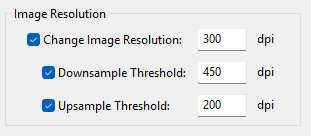
- If the checkboxes for Change Image Resolution and one of the Threshold values were activated, but no user-defined dpi values were specified, the default values were not applied, and incorrect values were used instead, resulting in color shifts and incorrect conversions.
- No scaling was applied during transparency reduction. - The error in the JSON job report, which caused the Statistic field to no longer be listed when the Minimize Output Channels function was enabled on the Document/Target tab of the configuration, has been fixed. (Ticket #254660)
- The Minimize Output Channels function on the Document/Target tab of the configuration has been optimized. Now, custom spot color rules created in the Spot Colors tab for converting spot colors are only taken into account if they are relevant to the spot colors present in the PDF files to be processed. Previously, only the Multicolor profile variants covered by the rules were examined, which may have excluded some profile variants. Depending on the PDF files, this now leads to better results with fewer channels despite custom spot color rules.
- The error that occurred when using the command line zcmd while simultaneously updating configurations via the Auto Import mechanism (accessible in the ZePrA Preferences) has been fixed. This error resulted in configurations not being available via zcmd. (Ticket #254646)
- An error has been fixed, whereby a “dummy” Job Control File created without BaseConfiguration and without Options displayed an error message during processing stating that the configuration could not be found. (Ticket #254664)
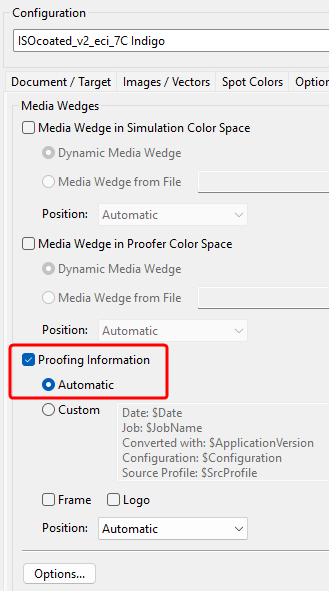
- The Proofing Information specified in the Proofing tab, which are indicated in the media wedge of the converted file, did not take into account that the file to be proofed might contain a different output intent instead of the Document Color Space or a different Target Color Space. The conversion itself was correct. This information error has been fixed for both the activated checkboxes Prefer PDF Output Intent for the Document Color Space and Maintain PDF Output Intent for the Target Color Space. (Ticket #234261)
- A bug in PDF 2.0 support in ZePrA has been fixed that caused a crash in certain cases where a PDF 2.0 file contained inline images. (Ticket #254690)
- Fixed a bug where ZePrA did not recognize the deletion of a spot color library in a configuration that used this library, which then led to errors during conversion. The bug only occurred if the library was a copy of another library.
- Fixed an error in the SaveInk Report under Tools where ink savings for Queues using Flows were not listed.
- Fixed a bug where a configuration with integrated spot color libraries imported via the zcmd command line was not completely overwritten if these libraries already existed in the ZePrA system.
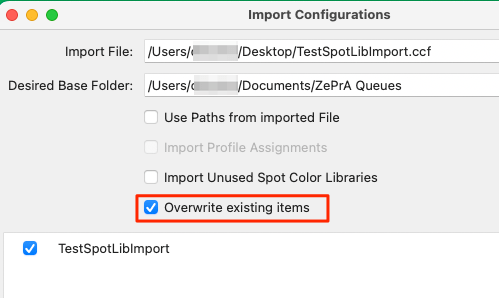
- Minor issues with the new Overwrite existing items checkbox in the Import Configurations dialog have been fixed, which caused spot color libraries to not display correctly under certain circumstances in the Preview.
- The description of the Job Properties in JSON format has been updated and contains the new information in the job report that is generated when embedding CXF data via Flows. The updated documentation, which is intended for system integrators, can be downloaded here: ZePrA_JobProperties.pdf
- The description of the Job Control File options has been updated and includes several changes and clarifications to Gradations, the Spot Color Rule Dictionary, and the default values for RescaleMinDPI and RescaleMaxDPI. The updated documentation can be downloaded here:
ZePrA_JobControlFile_ConfigurationOptions.pdf - Starting with ZePrA 13.1.1 installer, the Standard Profiles and MediaWedges folders are no longer deleted when uninstalling ZePrA on Windows, as they may be used by other ZePrA or ColorLogic programs.
Note: Since problems have occurred in the past under Windows when older versions of ZePrA were uninstalled after installing the latest ZePrA version, we recommend the following procedure: After uninstalling ZePrA, the latest ZePrA version should be reinstalled, even if it has already been installed. This ensures that the required standard profiles and media wedges are reinstalled and ZePrA can access them.
ZePrA 13.1 Release | August 2025
New Features and Bug Fixes in ZePrA 13.1
With the new base license ZePrA Process, three threads can now be used simultaneously, rather than just one as previously. This speeds up the processing of multiple files.
Even more processing speed can be achieved when adding the Multithreading module, such as in the Complete Color Management - Process Plus or Multicolor packages, or when adding the module to the ZePrA Process package. The Multithreading module makes all threads available that are possible on the system.
In the Preferences dialog, the new Maximum Allowed Threads information indicates the maximum number of threads that can be used with the ZePrA base license.
The screenshot shows an example of a computer with 8 CPUs, of which up to 3 can be used with the ZePrA Process base license:
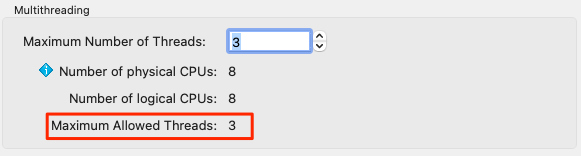
If the Multithreading module is licensed, the information Maximum Allowed Threads is not displayed and up to 8 threads can be used in this case, enabling even higher processing speeds:
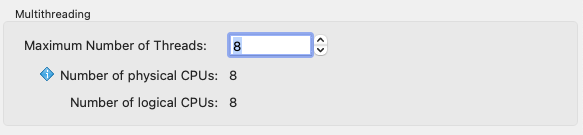
Note: Multiple threads greatly accelerate the processing of multiple jobs, but the processing of a single large file is not significantly faster.
Bug Fixes
- Fixed a PDF flattening issue with a shading using an exponential interpolation function where the exponent is not 1. (Ticket #254610)
- A user interface issue in the Registration dialog under Demo license request where the Send direct request button was not visible has been fixed. In addition, some text spacing issues have been fixed as well. (Ticket #254607)
- Fixed an issue where SmartLink could either not create the necessary subfolder or could not write the created DeviceLink to the appropriate folder. This could occur due to write access restrictions when trying to create the subfolders or when saving the profiles to these folders.
In such cases, error messages now indicate the write access problem, and the file to be processed is moved to the error folder. (Ticket #254620) - The CLI (zcmd) now assigns read and write permissions to folders it creates, so that the permissions match those of the parent folder. This avoids folder access problems when the CLI and the ZePrA UI are used on the same computer by different users. (Ticket #254620)
- The spot color calculation method Use the least Amount of Channels possible has been improved for a special spot color conversion. Previously, in one reported case, the calculation did not find the best match with the fewest number of channels. (Ticket #25458)
- Fixed an issue where clicking the question mark icon at the top of the Flows and Configurations dialogs opened two tabs in the browser.
- Fixed an issue that occurred when the “Copy Files” Procedure in a Flow was not assigned a path to a dedicated folder.
When converting a file with the CLI (zcmd) using a Flow that used the “Copy Files” Procedure, the CLI reported a directory access error (DirAccessErr).
With the fix, the file to be copied is now saved in the location defined in the command for the output file. In addition to the original file name, the copied file is given the name of the configuration used to avoid overwriting the final output file.
Note: In the ZePrA UI, the copied files would be saved in the output folder of the Flow if no path to a folder is provided. As the CLI does not have an output folder, the logical storage place is the same place where the converted output file is saved. - The unnecessary display of flattening log information on STDout when using the CLI (zcmd) to process files with a configuration that has the Calculate Ink Savings checkbox enabled, has been fixed.
ZePrA 13 Release | July 2025
New Features and Improvements in ZePrA 13
- New Flows tool provides new automation options
- New Auto Setup mode to set up Flows
- New options for enhanced Image Quality
- New image scaling options that now allow for upscaling or downscaling of the Image Resolution
- New option for changing the Image Dimension - Create Multicolor SaveInk profiles on-the-fly using SmartLink
- New SmartLink Method for conversion to Multicolor with preservation of CMYK color spaces
- New option to overwrite existing items when importing configurations
- Define spot color conversion via external files
- Expert DeviceLink Set is included in ZePrA 13
- New smaller but great features for more versatility, speed and quality
New Flows tool with more automation options
In ZePrA, there are several options to directly automate various tasks. The new Flows tool has been developed to further expand ZePrA's automation capabilities. It provides the ability to connect multiple configurations, route files based on conditions and perform simple automation tasks by setting up rules for file processing. Flows help to reduce the number of queues and hot folders.
More complex workflows, on the other hand, can be realized with high-end automation workflows such as HYBRID CLOUDFLOW or Enfocus Switch, into which ZePrA can easily be integrated.

Currently, the new Flows tool covers the following automation scenarios:
- Combining multiple configurations, such as a color conversion configuration with an ink-saving configuration, in just a single queue.
- Searching for output intents in PDF/X files and/or filtering out PDF files without output intents and forwarding them to the required configurations
- Distribution of files based on naming convention, file size, file type, pixel files width our height, or number of pages
- Embedding CxF/X-4 spectral data for spot colors in PDF/X files
- Automated creation of spot color reports for large numbers of PDF files and optional processing of the files with the best-suited configuration
Flows can be configured in the Define Flows section. Each flow carries a name and contains one or more Processing Rules. Similar to configurations, Flows can be created with or without a Queue and managed in the same way. Flows are identified in the Overview by a dedicated orange flow icon. For better distinction, configurations have their own blue icon.

The core of all Flows are the Processing Rules. A processing rule can include one or more Conditions. If a condition is met, a Procedure can be defined, which will then be executed. The next step after that can be defined as well. If a condition is not met, an alternative procedure and an alternative next step can both be defined.

Job Control Files have been improved to optimally support the new flow functions. This can be used to overwrite the settings of a flow or even to define a flow from scratch – similar to configurations.
In ZePrA 13, we have implemented the framework to provide you with a convenient start to automated flows. Please note that more options and application scenarios are likely to be added in the future depending on our customers' needs.
New Auto Setup mode to set up Flows
The new Auto Setup method Link two configurations creates workflows that apply two configurations in the specified order to the data during conversions.

Simply select the two configurations to be used for the conversion and follow the wizard to set up the Flow. The two configurations will then be applied in the specified order.

New options for enhanced Image Quality
There is a new tab under Configurations named Image Quality. All image quality-related aspects, such as the new options Image Resolution and Image Dimensions as well as existing options like Sharpening and Format Options, which were previously located in the Options tab, are now grouped together in this tab.

The new Image Resolution section allows changing the image resolution by adding thresholds for downscaling and upscaling. Previously, only a downscaling of the image resolution was possible; now, it is also possible to upscale it. The first checkbox defines the desired resolution and at least one of the threshold checkboxes must be enabled.
Another new section called Image Dimension is available for resizing image files. Among other things, this is useful for adjusting the usually enormous dimensions of pictures taken with smart phones. Note that this only applies to image files (TIFF, JPEG, PSD, PSB files) but does not affect images in PDF files.
Create Multicolor SaveInk profiles on-the-fly using SmartLink
ZePrA 13 provides the ability to create Multicolor SaveInk profiles on-the-fly using SmartLink. Previously, SaveInk for Multicolor was only available when using pre-calculated SaveInk profiles created by CoPrA, but was not available via SmartLink. Now there are three presets available in the Auto Setup Wizard and under Configurations to easily select the level of ink saving. Additionally, custom presets created in CoPrA (from version 11.1) can be shared with ZePrA 13.

For the SmartLink method SaveInk, the ink saving method can be set separately for CMYK and Multicolor 4-n channels.

New SmartLink Method for conversion to Multicolor with preservation of CMYK color spaces
There is a new SmartLink Method in the Configuration and the Auto Setup wizard whenever a Multicolor target profile with 5 and more channels has been selected. The method Multicolor – Preserve CMYK makes sure that CMYK objects in PDF files or CMYK image files are preserved as CMYK when converting to Multicolor.

This is a requirement from packaging customers who often get provide with files having CMYK plus spot colors. When printing, especially in digital printing but also in analog ECG printing, the requirement is that the spot colors get converted to Multicolor but objects that are CMYK in the original file should be preserved as CMYK after conversion. Of course, the CMYK objects will be converted to the CMYK part of the Multicolor target color space in order for the color rendering to be printed correctly.
When the new SmartLink Method is selected the generated multicolor separation preserves CMYK objects as CMYK. Other color spaces such as RGB or spot colors if the conversion is activated, are converted to Multicolor with the black and color generation of the target profile for best color fidelity. For image and vector conversions color exceptions are generated automatically.
New option to overwrite existing items in the Import Configurations dialog
When importing Configurations and Flows via the Import Configurations dialog, existing items such as folders, configurations, flows, ICC profiles, spot color libraries etc. are no longer imported and overwritten by default. This is a change compared to previous versions in which such items were overwritten, which was not desirable in all cases.
By default, ZePrA 13 does not overwrite existing elements, such as configuration names, if the new Overwrite existing Items checkbox is deactivated. In this case, existing items are not displayed in the list.
When enabling the checkbox Overwrite existing Items, all new elements are listed, including those that differ from the existing elements despite having the same name, for example configurations or queues that have the same name but different settings.

When importing, the existing elements are then replaced by the new ones containing the changed settings.
Define spot color conversion via external files
The spot color conversion rules (which define how spot colors are converted to process colors) are usually calculated by ZePrA, but they can also be defined by third-party tools via external files such as TXT and CxF files.
The option to use these external files has already been integrated into the user interface in ZePrA 12.1, but from ZePrA 13 onwards, these external files can also be used via Job Control Files. This allows on-the-fly adjustment of spot color conversion based on measurements and calculations directly at the printing press using appropriate third-party tools.
The Job Control File documentation has been updated accordingly and contains an explanation of the syntax.
Expert DeviceLink Set is included in ZePrA 13
From ZePrA 13, all 432 professionally created DeviceLink profiles of the Expert DLS Set are included with a new purchase. These profiles are open profiles that can be used in ZePrA as well as in all ICC applications that utilize DeviceLink profiles. This strengthens ZePrA's usability in a global world, as all international printing standards such as ISO, Gracol and Japan are covered.
New smaller but great features for more versatility, speed and better quality
- The times for starting and shutting down the program have been optimized - especially for environments with a large number of configurations.
- The performance when checking queue folders has increased when there are many queues.
- The progress of file processing is now also shown in the ZePrA application icon.
- An updated Adobe PDF flattening engine has been integrated that solves a few flattening issues reported from clients.
- The CrossXColor engine for the creation of SmartLink profiles has been integrated that is now compatible with the recent CoPrA 11.1.2 version.
- Includes the latest ColorAnt version (ColorAnt 11.1 with Measure Tool in version 8.1) for measuring spot colors and test charts.